SkinsMonkey is legit in the narrow sense, your skins arrive and nothing gets stolen, but after trading on it with our own money we cannot recommend it for value, and it lands at 3.5 out of 5. It is a skin-for-skin swap site where the real cost hides in expensive cases and inflated trade values, the famous 35% deposit bonus mostly cancels out that markup, and there is no way to ever get money back out. This SkinsMonkey review walks through our real trades, the numbers behind the value gap, the referral system, and the Trustpilot problem its marketing does not mention.
TL;DR
- SkinsMonkey is a trade site, not a marketplace. You swap skins with its bots or buy from them with balance, and that balance can never be withdrawn as money.
- No posted fee, but cases cost far more than elsewhere. Trade values run about 50% above CS.money’s on both sides, so they never match what a skin is worth anywhere else.
- The 35% deposit bonus is real and it is marketing math: the extra balance offsets the markup, it does not beat it.
- Signup is fast, the interface is smooth, and human support answered in five minutes. The everyday experience is honestly good.
- As of October 2026 Trustpilot has suspended SkinsMonkey’s rating for breaching its guidelines, and the site can block your items from trading with Overstock labels.
- Our verdict: 3.5 out of 5, scored as a trade site. Fine for a casual, low-stakes swap, and skins bought with balance sit close to market prices. Anyone who cares about value in a trade should trade elsewhere.
SkinsMonkey has no cash-out. Deposited money and trade balance can only be spent on skins from its bots. There is no bank, PayPal, or crypto withdrawal. If your goal is turning skins into real money, read our CSFloat review instead.
What Is SkinsMonkey?
SkinsMonkey is one of the biggest skin trade sites around, run by Virtual Asset Empire Ltd out of Cyprus and operating since around 2021. Its live counters claimed about 4.2 million registered users, 15.2 million completed trades, and roughly 145,000 items in stock when we tested it in July 2026, and it covers CS2, Rust, Dota 2, and TF2.
The model is skin-for-skin. You hand your skins to a SkinsMonkey bot and pick items from its inventory in return, topping up any difference with a cash deposit. There are no other players on the other side of the trade and no order book, just you and the house. That one design choice explains almost everything else in this review, including how the site actually makes its money.
How Does SkinsMonkey Work?
Getting started is genuinely easy. You log in with Steam, set your trade URL, and optionally leave an email for stock alerts. That is the whole onboarding, no document checks, no app to install, and in our test the whole thing took two to three minutes in a normal browser. For a basic swap you never verify anything beyond the standard Steam Guard confirmation on your phone.
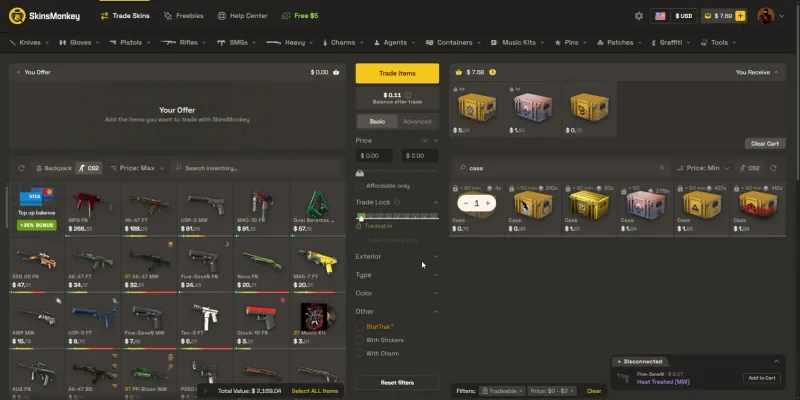
Building a trade works like a two-sided shopping cart. Your inventory sits on the left, SkinsMonkey’s stock on the right, and a balance counter shows the difference between the two sides. Filters cover price, trade lock, exterior, StatTrak, stickers, and charms, and the site feels fast while you browse. When you confirm, a bot sends the Steam offer and the items move.
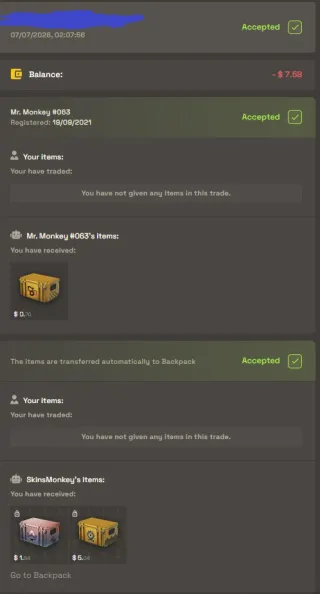
Our trades completed quickly and cleanly. The bot that handled ours, Mr. Monkey #063, is a branded account registered in 2021, which we rate above the anonymous level 0 bots we ran into on SkinVault. Mechanically, SkinsMonkey works exactly as advertised. The problem is not whether it works, it is what you pay for it working.
SkinsMonkey Fees and the 35% Bonus Trick
SkinsMonkey does not publish a fee percentage, and its own blog talks about a modest spread. Our test says the real cost is much bigger, and it comes in two layers that work together.
The first layer is the price board itself. Cases in SkinsMonkey’s inventory are priced well above what they cost elsewhere. We compared cases we could buy from the bot against three other places on the same day in July 2026:
| Case | SkinsMonkey | CS.money | CSFloat | Steam Market |
|---|---|---|---|---|
| Chroma Case | 5.04 | 4.63 | 4.47 | 6.91 |
| Dreams and Nightmares Case | 1.84 | 1.48 | 1.21 | 1.73 |
| Snakebite Case | 0.70 | 0.51 | 0.45 | 0.74 |
SkinsMonkey was the most expensive third-party option on all three, and the Dreams and Nightmares Case even cost more than on the Steam Market, where prices carry Valve’s cut. Anyone bulk-buying cases here is eating a loss on every single one.
SkinsMonkey Prices vs CSFloat and Steam
One purchase says little about a site’s prices, so we price the same five items on every marketplace we review, in one session. The basket is a case and four skins from about 3 to 300 dollars, priced at the cheapest listing on each site in the same wear, or the bot’s price where a site sells from bots. Here is SkinsMonkey against CSFloat, the Steam Community Market and CS.money, its closest rival.
| Item | SkinsMonkey | CSFloat | Steam Market | CS.Money |
|---|---|---|---|---|
| Dreams & Nightmares Case | $1.49 | $0.97 | $1.35 | $0.96 |
| AK-47 Slate (Well-Worn) | $3.20 | $3.09 | $4.39 | $3.60 |
| Desert Eagle Printstream (Field-Tested) | $33.03 | $32.19 | $47.00 | $32.49 |
| M4A1-S Hyper Beast (Field-Tested) | $114.27 | $111.07 | $160.83 | $112.46 |
| Flip Knife Doppler Phase 1 (Factory New) | $295.15 | $290.04 | $387.96 | $305.00 |
| Whole basket | $447.14 | $437.36 | $601.53 | $454.51 |
Our October price basket confirms the case problem and adds a nuance. The Dreams & Nightmares Case was the dearest of all 16 sites we priced, 54% above CSFloat, but the four skins we bought with balance sat within 2 to 4% of CSFloat. Across the whole basket, SkinsMonkey came in only 2.2% above CSFloat and 1.6% under CS.money. Trades are harder to compare, because the trade screen runs on SkinsMonkey’s own values.
Three skins from our inventory were enough to trade for a StatTrak Minimal Wear M4A1-S Mecha Industries on both SkinsMonkey and CS.money, the exact same skin. CS.money priced that M4 at about 142 dollars and our three skins at about 143. SkinsMonkey priced the M4 at 213.65 and our skins at 213.89. Both sides got the same premium of roughly 50%, so this swap cost us nothing extra, but it means a value on SkinsMonkey’s trade screen never matches what the same skin is worth elsewhere.

The second layer is the deposit bonus, and this is our main gripe with SkinsMonkey: the 35% bonus is not a gift, it is the accounting trick that makes the first layer possible. Every deposit method carries the bonus, you cannot opt out, so every dollar you put in becomes 1.30 dollars of balance, or 1.35 with a creator code. That sounds generous until you look at what you spend it on: cases priced 54% above CSFloat, and trade values set about 50% above CS.money’s. Inflate the prices, inflate the balance, and the site gets to advertise free money that the prices take back. In our testing the net effect was breaking roughly even with other markets on skins, and clearly losing on cases.
Deposits and the No Cash-Out Wall
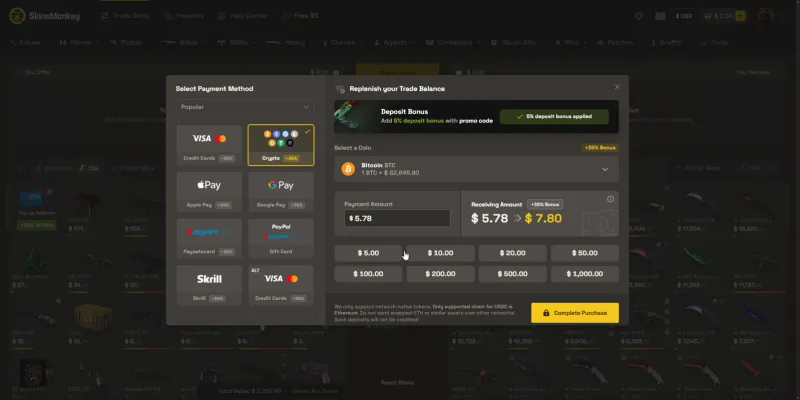
We deposited with Bitcoin: 5.78 dollars, credited within minutes as 7.80 dollars of balance after the 35% bonus, which is 30% from the site plus 5% from the creator promo code we entered at checkout. Cards, Apple Pay, Google Pay, Paysafecard, Skrill, and PayPal gift cards are also available, all carrying the same bonus.
Now the important part. That balance is a one-way street. SkinsMonkey’s own help pages state the balance cannot be withdrawn and can only be used in other transactions on the site. There is no bank transfer, no PayPal payout, no crypto withdrawal, nothing. Some third-party pages claim cash-outs run through the separate site SkinCashier, but during our whole test we found no mention of SkinCashier anywhere on SkinsMonkey itself. As far as a real user is concerned, money goes in and never comes out.
Depositing also auto-enrolls you in SkinsMonkey’s refund policy, which only covers items that never arrive and fraudulent purchases. There is no line during checkout that plainly warns your money becomes non-withdrawable balance. We think that deserves to be stated up front, not buried in a policy you agree to by paying.
The Overstock Problem
Liquidity is SkinsMonkey’s favorite selling point, and on paper 145,000 items is a deep pool. In practice the site controls both sides of every trade, and it uses that control. Several skins in our inventory could not be traded in at all because SkinsMonkey labeled them Overstock, meaning it decided it already holds enough of them. Others were blocked with an Unstable Price label.
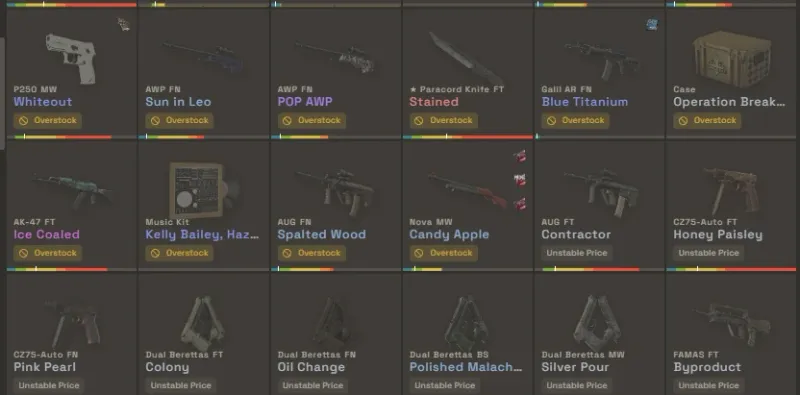
A marketplace with real buyers never tells you your item is unsellable, it just adjusts the price. Here the house decides what it accepts, when, and at what value, and there is nothing you can do about a blocked item except keep it or sell it somewhere else. Combined with the markup, our honest framing of trading here became “which deal screws us over the least”, and that is not a sentence anyone should have to think about on a trading site.
SkinsMonkey Referral System
SkinsMonkey does not have a public referral program for regular users. There is no page where you generate a link, invite a friend, and both earn something, and the promo-code field at deposit only applies creator codes for the extra 5% bonus.
What exists instead is an application-only affiliate program for content creators. The account dashboard shows the outline: share a code and link, gift your audience a 5 dollar first-trade bonus on top of the deposit bonus, and earn commission on every trade your referred users make. The actual numbers are hidden, the statistics panel stays greyed out behind a “Want to get access to our affiliate system? Contact Us” gate, and no commission rate or payout terms are published anywhere we could find.
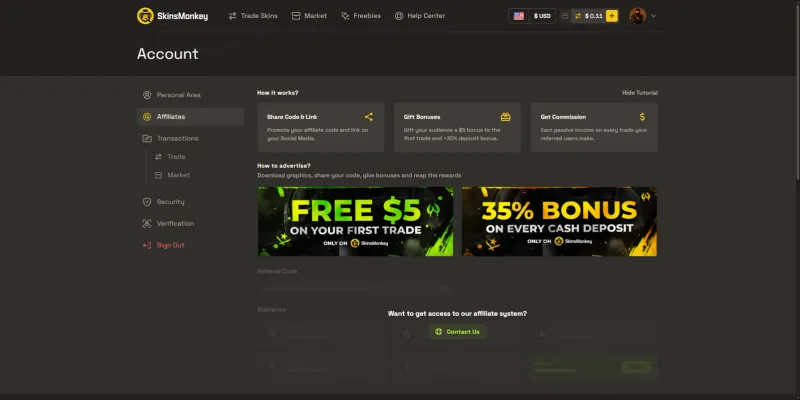
If you are a creator considering it, ask for the rate, the payout method, and whether earnings are withdrawable or just more trapped site balance before you promote anything, because none of that is public. For transparency, the buttons in this review are plain links, and we do not use a SkinsMonkey referral or affiliate code.
Is SkinsMonkey Legit and Safe?
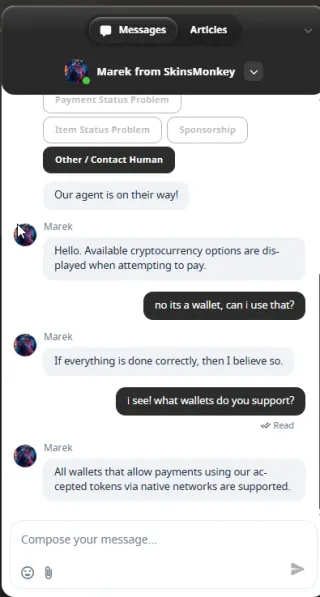
The good faith answer is yes, it functions. The site has run for years under a registered Cyprus company, our swaps completed in minutes, the bots are branded and aged rather than throwaway accounts, and nothing about our items or balance ever felt at risk mid-trade. Support impressed us most. We clicked “Other / Contact Human” in the live chat expecting a bot loop, and a real agent named Marek showed up within five minutes, answered wallet questions correctly, and never demanded an email first.
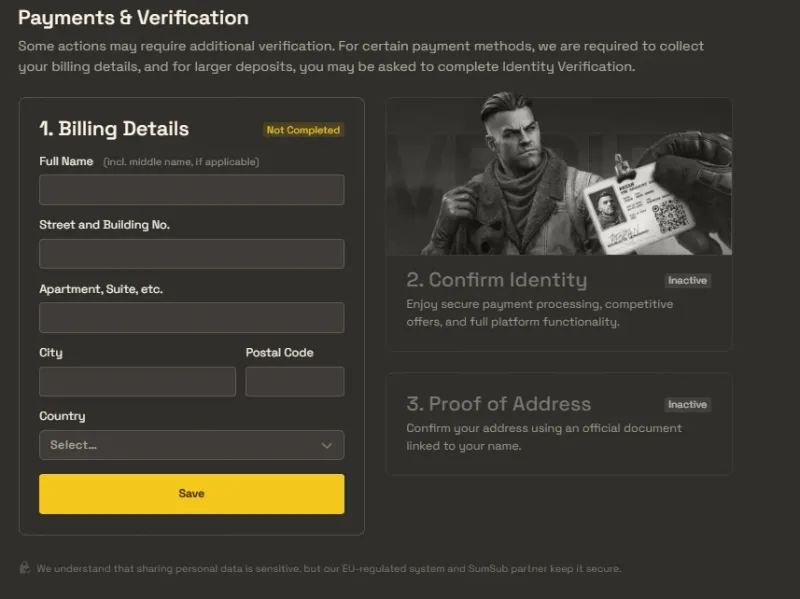
The “no KYC” reputation needs one nuance. Basic swapping needs nothing, but the payments section has a full SumSub verification flow with billing details, ID, and proof of address that can trigger on certain payment methods and larger deposits. Plan for that if you intend to move real money through the site.
The trust problem sits at the reputation layer. SkinsMonkey’s marketing leans hard on review scores, and as of October 2026 Trustpilot shows no rating for SkinsMonkey at all, replaced by a notice that the rating is unavailable due to a breach of Trustpilot’s guidelines and a second notice that the company is displaying Trustpilot content in a misleading way. Whatever the details behind that suspension, a trading site that loses its rating over how it handles reviews has earned extra skepticism, especially one whose homepage makes claims about licenses and ratings we could not verify anywhere independently. Add the auto-agree refund policy and the trapped balance, and we would not keep more money here than we are actively spending. For the account-level threats that hit traders on every platform, our guide on how to not get scammed in CS2 covers the fake-bot and impersonation tricks to watch for.
SkinsMonkey vs Other Trade Sites
Within the trade-site lane, SkinsMonkey is the polished one. The interface is smoother than most, the bots are fast, support is human, and next to its near-clone SkinVault it wins on presentation and support, though its bot is pickier and blocks more of your skins. If the only question is which swap site feels nicest to use, SkinsMonkey takes it. The one rival that competes on scale rather than polish is Tradeit.gg, a bigger bot-trade site with instant sells, but it never shows you a clear fee either, so the real cost is just as hard to pin down.
The moment value enters the picture, the ranking flips. On our own items, CS.money offered the same trades at meaningfully lower prices, and proper marketplaces beat both, since listings there compete against other sellers instead of a house price. Our full SkinVault review shows the same pattern from the other direction, and CSFloat remains our benchmark for getting actual market value and real money out. A trade site charges you for convenience. SkinsMonkey just charges more for it than the convenience is worth.
SkinsMonkey Pros and Cons
Pros
- Signup in two to three minutes, Steam login only, no KYC for basic swaps
- Smooth, fast interface with strong filters
- Branded, aged trade bots and clean, quick trades
- Human live-chat support within five minutes in our test
- Big inventory across CS2, Rust, Dota 2, and TF2
Cons
- No cash-out of any kind, balance and deposits are trapped on-site
- Cases priced far above other marketplaces, 54% over CSFloat in our price basket
- The 35% deposit bonus mostly offsets the markup rather than adding value
- Overstock and Unstable Price labels let the site block your items from trading
- Trustpilot rating suspended for a guidelines breach as of October 2026
- Marketing claims (license, ratings, trade speed) we could not verify independently
- No public referral program, affiliate terms hidden behind an application
Final Verdict
A note on the score. SkinsMonkey is a trade site, not a marketplace, so there is no cash-out product to judge and we leave that axis out entirely, with the remaining weights scaled up to compensate. The fact that money only moves one way still matters, which is why it keeps its own section above and stays part of the verdict.
SkinsMonkey is the strange case of a site that nails everything around the trade and fails the trade itself. Access, speed, interface, and support are genuinely among the best we have tested in this series. Then you look at the numbers, and the core product is a trade that values the bot’s skins far above yours, into a balance you can never withdraw, on a site that decides which of your items it will even accept.
After testing it, we would call it fine for a casual player who wants to swap a few skins with zero friction and is not counting dollars. It is wrong for everyone else, and the more your skins are worth, the more wrong it gets. That is how it lands at 3.5 out of 5 as a trade site, level with SkinVault, with better polish and support but a pickier bot that blocks more of your skins. Keep in mind that number does not compare one-to-one with our marketplace ratings, since a marketplace also gets judged on cashing out and a trade site simply has none.
Our rating: 3.5/5, smooth to use, expensive to trust with value.
Frequently Asked Questions
Is SkinsMonkey legit and safe in 2026?
SkinsMonkey is a real, working trade site, not an exit scam. It has operated since around 2021 under Virtual Asset Empire Ltd (Cyprus), our trades all completed, and a human support agent answered within five minutes. The trust picture has a serious dent though: as of October 2026, Trustpilot has suspended SkinsMonkey's rating for breaching its guidelines, with a notice that the company is displaying Trustpilot content in a misleading way, so the glowing score its marketing quotes is not currently backed by Trustpilot itself.
Can you withdraw money from SkinsMonkey?
No. SkinsMonkey has no cash-out at all. Money you deposit becomes site balance, and that balance can only be spent on skins from SkinsMonkey's bots. There is no bank, PayPal, or crypto withdrawal, and by depositing you automatically agree to a refund policy that only covers items that never arrive or fraudulent charges. If you want to turn CS2 skins into real money, use a marketplace like CSFloat instead.
What are SkinsMonkey's fees?
There is no posted percentage fee. The cost hides in the prices. Cases are expensive: in our October 2026 price basket the Dreams & Nightmares Case cost 54% more than on CSFloat, while the four skins we bought with balance sat within about 4%. Trade values run high as well: on our test trade SkinsMonkey valued both our three skins and the M4A1-S Mecha Industries (StatTrak, Minimal Wear) we got for them about 50% above CS.money. The swap itself came out even, but a SkinsMonkey trade value does not compare with any other site's price.
Is the SkinsMonkey 35% deposit bonus real?
The bonus is real, we received it on a Bitcoin deposit (5.78 dollars became 7.80 in balance). It just does not make you richer, because cases and trade values are marked up by a similar amount. The extra balance mostly offsets the markup you pay on the way out, so treat the 35% as marketing math, not free value.
Does SkinsMonkey have a referral program?
Not for regular users. There is no public refer-a-friend system where you share a code and earn a cut. SkinsMonkey runs an application-only affiliate program aimed at content creators: you contact them, and if accepted you get a code, commission on referred trades, and bonuses to gift to your audience. Rates and terms are not published anywhere public.
What does Overstock mean on SkinsMonkey?
Overstock is a label SkinsMonkey puts on items in your inventory that its bots refuse to accept, usually because the site says it already holds too many of them. In our test several of our skins were blocked as Overstock or Unstable Price, which means you cannot trade them in at all. The site decides this, not you, so a big inventory does not guarantee you can actually use it.
Who should use SkinsMonkey?
Someone who wants a fast, zero-friction way to swap skins they already own and does not care about squeezing out full value. Signup takes two minutes with just a Steam login and trade URL, the bots are quick, and the interface is genuinely smooth. Anyone who is price-sensitive, wants to cash out, or is trading higher-value skins should use a real marketplace instead, because a trade can value the bot's skin 50% above market.
Join Our Trading Community
Weighing a swap and not sure the numbers add up? Our CS2 Central Discord has 25,000+ members and dedicated trading channels with active moderation. Post both sides of the trade and we will tell you what the same deal costs elsewhere.
Further Reading
- CSFloat Review, our top-rated CS2 marketplace, and where to actually cash out
- SkinVault Review, the other trade-for-skins site, same model, rougher edges
- 10 Most Common CS2 Scams, how to spot the fake-bot and impersonation tricks before they cost you
