CSFloat has become the largest Western peer-to-peer marketplace for CS2 skins, but is it actually worth using? This CSFloat review covers the fees, the features, the safety, the KYC, and whether it earns its reputation as the go-to platform for skin trading in 2026.
TL;DR
- CSFloat is a legit, safe P2P marketplace running since 2020 with a 4.8 Trustpilot score. Your skins stay in your Steam inventory until they sell.
- Fees are among the lowest around: 2% to sell, 0% to buy. Deposits run about 2.8% by card or 1% with crypto.
- Withdrawal fees run 0.5% to 2.5% and drop the more you sell. Our first bank payout took about 11 days, a later one cleared in 3.
- KYC runs through a third party called Sumsub and can be demanded at any time. You can often skip it, but do not count on it.
- Our verdict: 4.3 out of 5. The best Western marketplace for low fees and serious skin tools, and the cheapest basket in our price test.
What Is CSFloat?
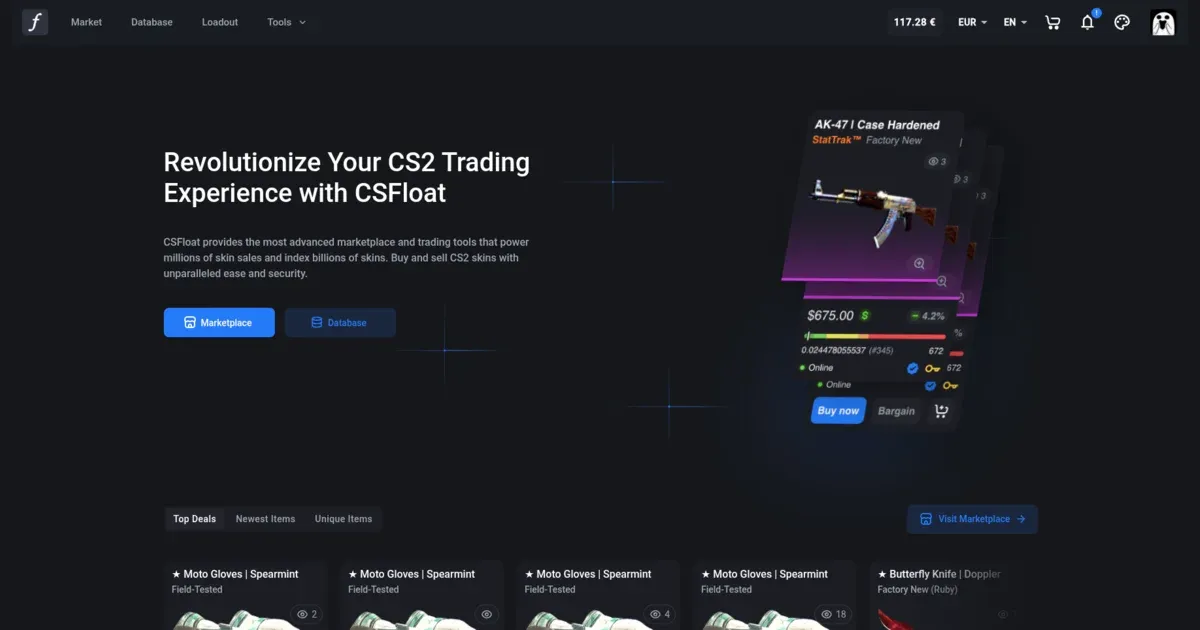
CSFloat is a peer-to-peer (P2P) marketplace for buying and selling CS2 skins. Unlike bot trading sites where you trade with automated bots, CSFloat connects real buyers with real sellers. Your items stay in your Steam inventory until they sell, and trades happen directly between users.
The marketplace launched in 2020 and has grown to become the most active CS2 marketplace in the Western hemisphere. It’s known for three things: low fees, advanced float value tools, and a massive skin database called FloatDB.
How Does CSFloat Work?
The peer-to-peer model is what sets CSFloat apart from instant-sale sites. Here’s how the process works:
For Sellers
- List your skin on CSFloat with your desired price
- Your item stays in your Steam inventory (you can still use it in-game)
- When someone buys, you receive a notification
- Send the trade offer through the CSFloat extension
- Once the buyer accepts and CSFloat verifies the trade, you get paid when Steam’s trade protection window ends
For Buyers
- Browse the marketplace or search for specific items
- Purchase the item (or send a bargain offer)
- Wait for the seller to send you a trade offer
- Accept the trade on Steam
- The item is now in your inventory
The key requirement is the CSFloat Market Checker extension for Chrome or Firefox. This extension verifies trades and ensures you’re sending/receiving the correct items. It’s essential for using the platform safely.
CSFloat Fees Explained
One of CSFloat’s biggest selling points is its competitive fee structure:
| Fee Type | Amount |
|---|---|
| Seller Fee | 2% |
| Buyer Fee | 0% |
| Deposit Fee (Card) | 2.8% |
| Deposit Fee (Bank) | 1.5% - 3.3% |
| Deposit Fee (Crypto) | 1% |
| Withdrawal Fee | 0.5% - 2.5% |
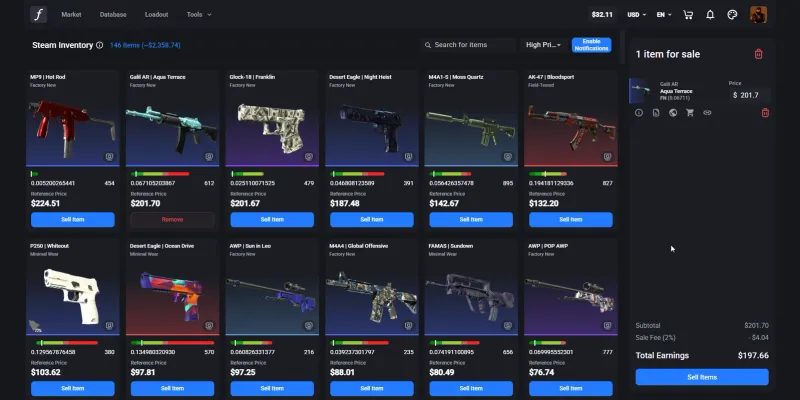
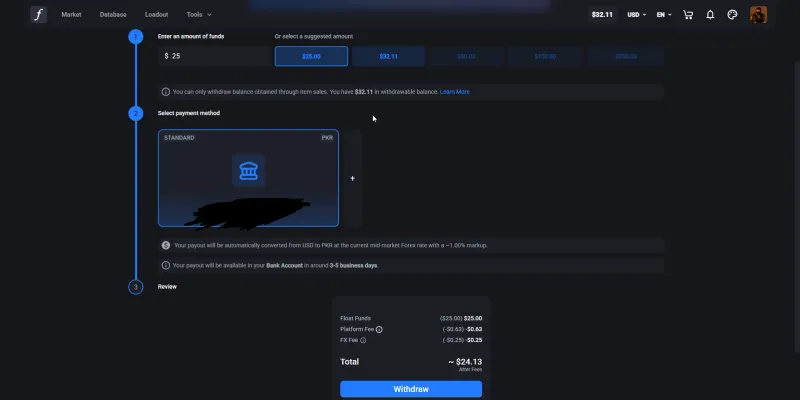
The 2% seller fee is among the lowest in the industry. For comparison, Steam takes 15% (a 5% Steam Community Market fee plus a 10% developer fee, which for CS2 goes to Valve as the game’s publisher), and many other marketplaces charge 5-10%. Deposit fees depend on the method: around 2.8% by card, 1.5% for a US bank transfer, 3.3% for a SEPA debit in euros, and just 1% with crypto. Payouts run through Stripe to a bank account, to a debit card in some countries such as the US, or as USDC crypto on the Polygon network where Stripe supports it. There is no PayPal option, and bank withdrawals add no transfer fee on top of the platform fee. You can also only withdraw balance that came from item sales, as the withdrawal screen below states, so money you deposit stays on the site to spend.
The withdrawal fee itself is dynamic and tied to your total sales volume: new sellers pay around 2.5%, and the most active traders pay as little as 0.5%. CSFloat does not publish the exact volume breakpoints, so be wary of any guide that lists precise dollar tiers. If you are outside the US, watch one more cost. Payouts in other currencies are converted at roughly a 1% FX markup, which traders often flag as the most annoying hidden cost.
CSFloat Features
Beyond basic buying and selling, CSFloat offers a suite of powerful tools that make it stand out from competitors.
Float Database (FloatDB)
FloatDB indexes over 1.6 billion CS2 skins across millions of inventories. You can search for:
- Specific float value ranges (for example, find all 0.000x floats)
- Paint seeds (pattern indexes)
- Sticker combinations
- StatTrak and Souvenir items
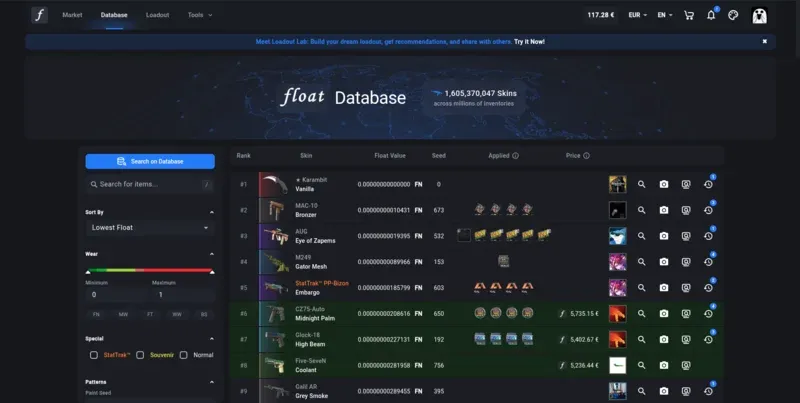
This is invaluable for collectors hunting rare items. Want to find if a 0.0000x AWP Dragon Lore exists? FloatDB can tell you.
Keep one limitation in mind. FloatDB only shows an item’s last known location. If a skin moves into a private inventory, it effectively drops off the radar. The last record is whoever indexed it before the trade. There is also a lag. Trade a knife to someone with a private inventory and FloatDB can still list you as the owner until the move registers, even though the item already changed hands.
Float Appraiser (AI Pricing)
CSFloat’s machine learning-powered Float Appraiser predicts fair prices based on float value, market trends, and historical sales. In June 2025, CSFloat updated the model and said it cut relative pricing errors by about 70%.
While useful as a reference, experienced traders recommend cross-checking suggested prices against other marketplaces like Buff163. The AI can sometimes be off on niche items.
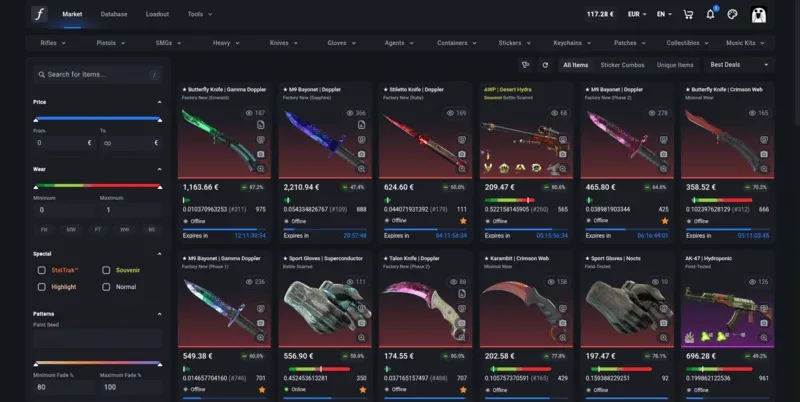
Advanced Marketplace Filters
The marketplace offers powerful filtering options:
- Float value ranges (minimum/maximum)
- Fade percentage filters
- Blue percentage for Case Hardened items
- Charm pattern filtering
- Multiple paint seed filtering
- Sticker and sticker position filters
- Filter presets (save your common searches)
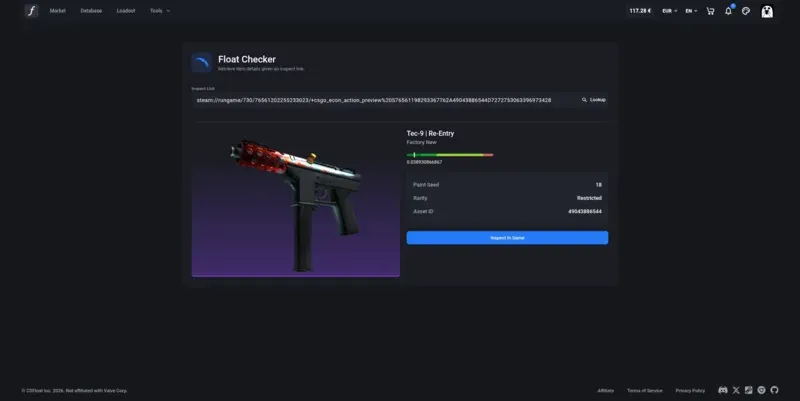
Float Checker Tool
Paste any Steam inspect link to instantly see a skin’s float value, paint seed, rarity, and other details. Perfect for checking items before trading.
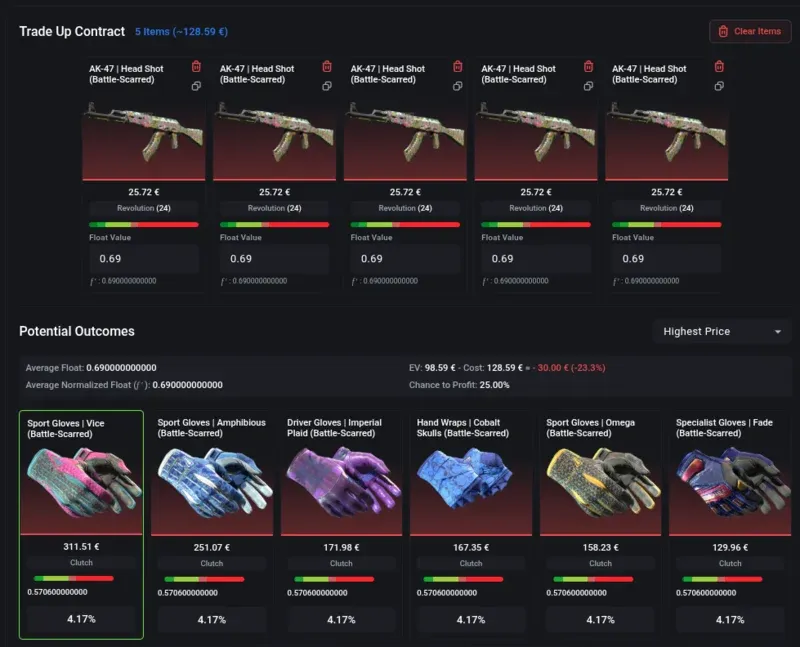
Trade-Up Calculator
Planning a trade-up contract? CSFloat’s calculator shows all potential outcomes with exact probabilities and expected values. It was updated in October 2025 to reflect the new CS2 trade-up mechanics.
Bargaining System
For items over $30, you can send bargain offers below the listed price. Sellers can accept, decline, or counter. This is great for getting better deals, but be careful: sending too many lowball offers can get your account temporarily restricted from making offers.
Buy Orders
Set up buy orders for items at your desired price. When someone lists an item matching your criteria at or below your offer, it automatically purchases. This is useful for sniping deals or acquiring specific trade-up skins.
Loadout Lab (New in 2025)
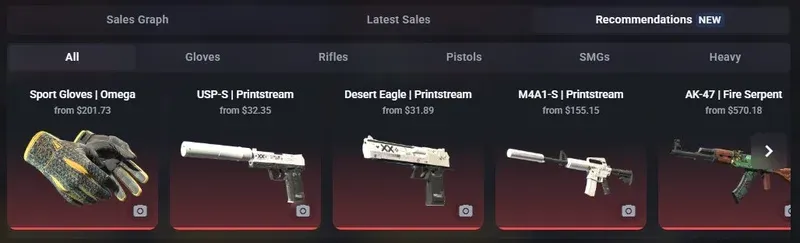
Launched in November 2025, Loadout Lab is CSFloat’s AI-powered loadout builder. You can build your dream CS2 loadout, get personalized skin recommendations, and even receive sticker suggestions based on millions of analyzed combinations.
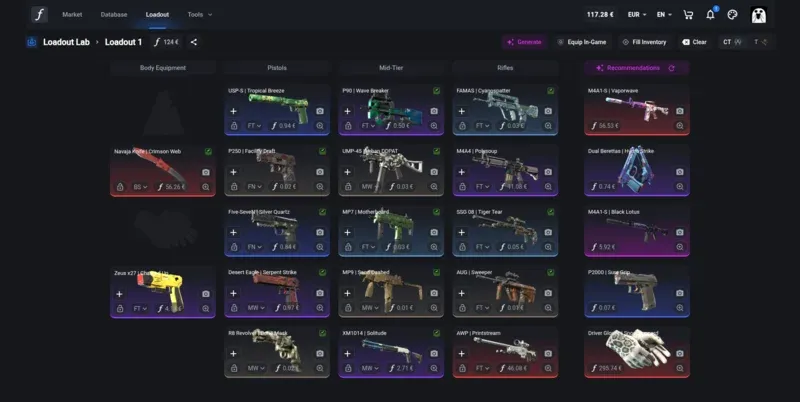
The recommendations feature suggests skins that match your style and budget, making it easier to plan purchases.
CSFloat Pros and Cons
Pros
- Lowest fees: 2% seller fee beats most competitors
- Items stay in your inventory: Use your skins while they’re listed
- Fast delivery: Receive items within hours (then the standard 7-day Steam hold)
- Advanced tools: FloatDB, Float Appraiser, trade-up calculator
- Bargaining: Negotiate prices on items over $30
- Buy orders: Set your price and wait for matches
- Trustworthy: 4.8 stars on Trustpilot, operating since 2020
- Multiple currencies: Support for 15+ currencies
- More than weapon skins: Agents and Music Kits are listed too
Cons
- Requires browser extension: Must install CSFloat Market Checker
- Seller must be online: P2P means waiting for sellers to send trades
- Withdrawal fees: 0.5-2.5% to cash out (decreases with volume)
- Slower than instant-sale sites: Not ideal if you need cash immediately
- Sale money is held: Proceeds stay locked for about 8 days so a reversed trade can be refunded to the buyer
- Customer support: Slow. Members of our Discord told us their tickets went unanswered, an email we sent ourselves took about a month to get a reply (it did solve our question), and every KYC retry means a new ticket and a wait for a fresh link
- Offer spam restrictions: Sending too many bargains can temporarily block you
Is CSFloat Safe and Legit?
Yes, CSFloat is safe and legitimate. Here’s why:
- Operating since 2020: over six years of consistent operation
- 4.8-star rating on Trustpilot: Over 9,500 reviews as of October 2026
- Transparent company: CSFloat Inc. is a registered business
- Active development: Regular updates and new features
- Large community: Official Discord with 15,000+ members
- Account protection: Warning and suspension system for bad actors
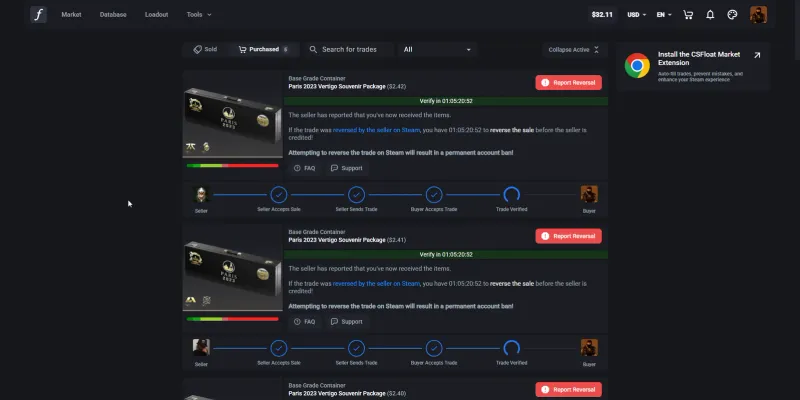
The peer-to-peer model also adds safety: your items never leave your inventory until you actively send them in a verified trade. There’s no risk of a marketplace “exit scam” taking your deposited items.
In our own testing, the bigger real-world annoyance was not scams but sellers who simply never send the trade. When that happens you cancel the purchase and your balance comes straight back, so you never lose money, but you do lose time finding another listing.
Fake CSFloat Discord servers have been used to scam users. Always use the official Discord link from the CSFloat website, not random invites.
CSFloat KYC and Verification
One thing worth understanding before you deposit is verification. CSFloat does not run its own identity checks. It hands Know Your Customer (KYC) verification to a third party called Sumsub, and that is where the friction shows up.
You can do plenty on CSFloat without ever verifying: sign in with Steam, buy, sell, and in our experience even link a bank account and withdraw. The catch is that KYC can be demanded with no warning. CSFloat requires it for SEPA Direct Debit deposits and for crypto withdrawals once you pass roughly $1,000, and support can also ask for it on card deposits for some accounts. So do not assume you can always skip it. The moment the platform wants verification, your money sits behind that wall until you clear it.
Clearing it is not a given either. When we hit the KYC check, Sumsub rejected a valid national ID card and a valid passport several times with no explanation. Each retry meant opening a support ticket and waiting for a moderator to send a fresh verification link. This is not just us: Sumsub’s Trustpilot page is full of people whose legitimate, government-issued IDs get auto-rejected in seconds with no human review.
If you are under 18, think twice before depositing real money. CSFloat’s terms require you to be of legal age, and KYC involves a photo of your ID plus a live face scan. If verification ever flags that you are underage, you risk your funds being frozen behind a check you cannot pass. Assume KYC can be triggered at any time, not that you will slip past it.
CSFloat vs Other Marketplaces
How does CSFloat compare to alternatives?
| Platform | Type | Seller Fee | Best For |
|---|---|---|---|
| CSFloat | P2P | 2% | Low fees, float tools |
| Buff163 | P2P | 2.5% | Chinese market access |
| Skinport | Hybrid | 8% (6% over 1k) | Buying, no extension |
| Steam Market | Official | ~15% | Steam Wallet funds |
For Western users, CSFloat offers the best combination of low fees and powerful features. Buff163 has even higher volume but is restricted to Chinese users for selling and withdrawals.
CSFloat Prices vs Steam and Skinport
One purchase says little about a site’s prices, so we price the same five items on every marketplace we review, in one session. The basket is a case and four skins from about 3 to 300 dollars, priced at the cheapest listing on each site in the same wear. Here is CSFloat against the Steam Community Market and Skinport, its closest rival.
| Item | CSFloat | Steam Market | Skinport |
|---|---|---|---|
| Dreams & Nightmares Case | $0.97 | $1.35 | $1.16 |
| AK-47 Slate (Well-Worn) | $3.09 | $4.39 | $3.37 |
| Desert Eagle Printstream (Field-Tested) | $32.19 | $47.00 | $34.04 |
| M4A1-S Hyper Beast (Field-Tested) | $111.07 | $160.83 | $110.52 |
| Flip Knife Doppler Phase 1 (Factory New) | $290.04 | $387.96 | $295.62 |
| Whole basket | $437.36 | $601.53 | $444.71 |
CSFloat is the reference in every review we write, and the basket shows why. Of the 16 marketplaces we priced, none matched its total. It was not the cheapest on any single item, but it was never far off the cheapest, and every other site lost ground somewhere. Against the Steam Community Market the whole basket cost about 27% less.
For a smaller, higher-risk alternative, we also tested HaloSkins, a marketplace tied to China’s C5Game. It cost about 4% more than CSFloat on our price basket, limits you to crypto withdrawals and has thinner support.
How to Get Started on CSFloat
Ready to try CSFloat? Here’s how to get set up:
- Visit CSFloat and sign in with your Steam account
- Install the browser extension (Chrome or Firefox) from the Tools menu
- Set your Steam inventory to public in your Steam privacy settings
- Add your Steam trade link in your CSFloat profile
- Complete KYC verification if prompted (CSFloat may require it for certain deposit or withdrawal methods, see the KYC section above)
- Deposit funds via card or crypto, or sell skins from your inventory
Once set up, you can browse the marketplace, set up buy orders, or list your own items for sale.
CSFloat Referral System
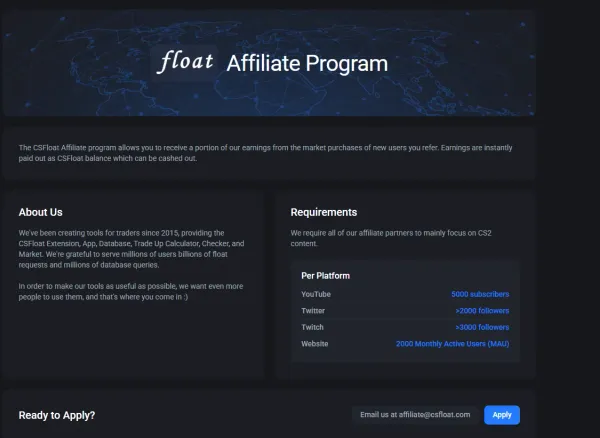
CSFloat has a referral system, but it is invite-only. The site calls it an affiliate program, and unlike marketplaces that let anyone sign up, you have to apply and clear a follower bar first: 5,000 YouTube subscribers, 2,000 Twitter followers, 3,000 Twitch followers, or a website with 2,000 monthly active users, and your content has to be CS2-focused. Approved creators get a share of CSFloat’s earnings on purchases from users they refer, paid out instantly as CSFloat balance you can cash out. CSFloat does not publish the exact rate, so treat it as something agreed when you apply rather than a fixed number. The full requirements are on its affiliate page.
To be upfront, the “Try CSFloat” buttons on this page use our referral link. It costs you nothing extra and does not change the price you pay. If you want to run your own, the follower bar above is the gate to clear first.
Final Verdict
In our own hands-on testing, liquidity is the standout. We listed a skin that does not move often, priced it fairly, and it sold within 15 minutes. Cashing out to a bank was slower: our first withdrawal took around 11 days to land, though a later one cleared in 3. The KYC wall is the one part that can genuinely trip you up, so go in expecting it.
CSFloat is the best option for CS2 skin trading if you prioritize low fees and don’t mind the peer-to-peer model. The 2% seller fee is hard to beat, and the additional tools (FloatDB, Float Appraiser, trade-up calculator, Loadout Lab) make it invaluable for serious traders and collectors.
The main downsides are that trades aren’t instant and you need to install a browser extension. If you need immediate cash, an instant-sale site might be better despite higher fees. But for most traders, CSFloat’s advantages far outweigh these minor inconveniences.
Our rating: 4.3/5, the go-to marketplace for CS2 skin trading in 2026.
Frequently Asked Questions
Is CSFloat safe and legit?
Yes, CSFloat is a legitimate and safe platform. Its marketplace has been running since 2020, has a 4.8-star rating from over 9,500 reviews on Trustpilot as of October 2026, and uses peer-to-peer trading with secure verification systems. Your items stay in your Steam inventory until sold.
What are CSFloat's fees?
CSFloat charges a 2% seller fee (one of the lowest in the industry) and 0% buyer fee. Withdrawal fees range from 0.5% to 2.5% depending on your total sales volume, and the more you sell, the lower your withdrawal fee becomes.
Is CSFloat cheaper than Steam?
Yes, by a wide margin. On our five-item price basket from October 2026, the whole basket cost 27% less on CSFloat than on the Steam Community Market and 1.7% less than on Skinport. Of the 16 marketplaces we priced, CSFloat had the lowest total, which is why we use it as the reference in every review.
What are CSFloat's deposit fees?
Deposit fees depend on the method: about 2.8% by card, 1.5% for a US bank transfer, 3.3% for a SEPA debit in euros, and 1% with crypto (USDC or USDP). There is no fee to list skins you already own.
How much does CSFloat charge to withdraw?
The withdrawal fee runs from 0.5% to 2.5% of the amount and drops as your total sales on CSFloat grow. Bank transfers add no extra fee, but cashing out in a non-USD currency adds roughly a 1% FX conversion cost on top.
How does CSFloat work?
CSFloat is a peer-to-peer marketplace. Sellers list items that stay in their Steam inventory until sold. When someone buys, the seller sends the item directly to the buyer via Steam trade. CSFloat verifies the trade and releases payment to the seller. The CSFloat browser extension handles trade verification automatically.
How long does it take to receive items?
Typically within a few hours, depending on how quickly the seller sends the trade offer. Since it's peer-to-peer, sellers need to be online to complete trades. Items you receive have a 7-day trade hold from Steam before you can resell them.
Can I bargain on CSFloat?
Yes, CSFloat allows bargaining on items priced over $30. You can send offers below the listed price, and sellers can accept, decline, or counter-offer. Be careful not to send too many lowball offers, as this can result in a temporary restriction.
What is FloatDB?
FloatDB is CSFloat's massive database indexing over 1.6 billion CS2 skins. You can search for specific float values, paint seeds, sticker combinations, and more. It's invaluable for finding rare items or checking if a specific skin exists.
What is Loadout Lab?
Loadout Lab is CSFloat's AI-powered loadout builder launched in November 2025. It helps you build your dream CS2 loadout with personalized skin recommendations and suggests sticker combinations based on millions of data points.
Do you need KYC to use CSFloat?
Not always. You can sign in with Steam, buy, sell, and often withdraw without verifying. But CSFloat can require KYC at any time, including for SEPA deposits, crypto withdrawals over roughly $1,000, and some card deposits. Verification runs through a third party called Sumsub, so do not assume you can avoid it.
Can you use CSFloat if you are under 18?
CSFloat's terms require you to be of legal age, which is 18 in most regions. Because KYC involves a photo of your ID and a live face scan, an underage account risks having its funds frozen if verification flags your age. If you cannot pass KYC, do not deposit real money.
How do you join CSFloat's affiliate program?
You apply by email, and you need a CS2-focused following: 5,000 YouTube subscribers, 2,000 Twitter followers, 3,000 Twitch followers, or a website with 2,000 monthly active users. There is no open sign-up the way some other marketplaces offer. Approved affiliates earn a share of CSFloat's earnings on purchases by users they refer, paid instantly as CSFloat balance. CSFloat does not publish the exact rate.
Join Our Trading Community
Want to discuss CS2 trading with other players? Our CS2 Central Discord has 25,000+ members and dedicated trading channels with active moderation to help prevent scams. Join us to get trading advice, find teammates, and stay updated on market news.
Further Reading
- The full CS2 marketplace ranking, every site we tested, with CSFloat as the benchmark
- 10 Most Common CS2 Scams, the scams to watch for when trading skins
- Steam Desktop Authenticator Guide, for managing trade confirmations on PC
- CS2 Rare Cases Removed from Drops, the market impact of Valve removing 35+ cases from the drop pool
