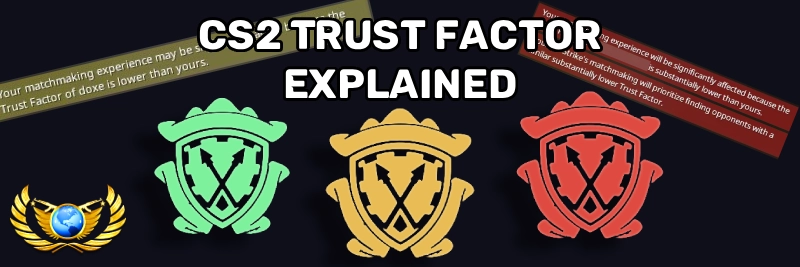
If you've ever queued into a CS2 match and immediately faced blatant cheaters, had 40-minute queue times, or noticed the dreaded red warning when partying up with friends, you've experienced the effects of Trust Factor. It's one of the most important and least understood systems in Counter-Strike 2, and it can make or break your matchmaking experience.
In this guide, we'll explain exactly how Trust Factor works based on Valve's official statements, a GDC presentation by Valve's John McDonald, KERO's in-depth Trust Factor breakdown, and years of community research. We'll cover how to check it, what affects it, and how to fix it if yours is low.
What Is Trust Factor?
Trust Factor is a hidden score assigned to every Steam account that determines who you get matched with in CS2 competitive and Premier matchmaking. First introduced in 2016 and made public in November 2017, it replaced the old Prime-only matchmaking system.
Think of Trust Factor like a credit score for your Steam account. It evaluates your entire history across Steam, not just CS2, and uses that data to predict how likely you are to provide a positive matchmaking experience. Players with similar Trust Factors are matched together.
The goal is simple: keep legitimate players together and isolate cheaters into their own lobbies. According to Valve, Trust Factor doesn't reduce the rate of cheating itself, but rather reduces the impact of cheaters on legitimate players.
Key Facts from Valve
The following facts come from Valve's GDC presentation on anti-cheat and official blog posts:
- Trust Factor uses a model that predicts how likely a player is to receive a ban in the future
- It was expanded into Steam Trust in 2019, enabling it to be used across any game on Steam
- It is a separate system from VAC, VACNet, and the former Overwatch system
- Matchmaking prioritizes Trust Factor over skill, which can sometimes result in uneven skill matchups
- The system is conservative with lowering trust, meaning it's designed to err on the side of not punishing innocent players
How Does Trust Factor Work?
Valve intentionally keeps the exact factors secret to prevent gaming the system. From their official FAQ:
"We are not providing the list of factors used in the Trust Factor matchmaking system. We don't want players to have to worry about any particular action while they're playing Counter-Strike 2 or other games on Steam."
However, between Valve's public statements, the GDC presentation, and extensive community testing, we know the system considers:
- Steam account age and activity – Older, actively used accounts score higher than new or dormant ones
- CS2 playtime and experience – Service medals, XP levels, and hours played
- Prime Status – Having Prime and a linked phone number is confirmed to improve Trust Factor
- Report history – How often you are reported and in what timeframe
- Associated accounts – Valve can detect connections to suspicious accounts, including friends who cheat or alt accounts with bans
- VAC and game bans – Bans in any Steam game negatively affect your CS2 Trust Factor
- Steam spending and library – Overall investment in your Steam account
- Behavior across all Steam games – Not just CS2, but your entire Steam footprint
Importantly, Trust Factor filters exclusively on cheating likelihood, not toxicity. A player who is toxic in voice chat but doesn't cheat may still have high Trust Factor.
Trust Factor Colors Explained
While you can't see a numerical Trust Factor score, CS2 uses a color-coded warning system when you queue with other players. There are three levels:

Green (High Trust)
No warnings appear. This is the ideal state. You'll experience the best match quality with fewer cheaters, shorter queue times, and more legitimate players.

Yellow (Slightly Low)
A yellow warning appears when queuing with friends. Match quality begins to degrade. You may start encountering more suspicious players and longer queue times.

Red (Very Low Trust)
A red warning appears. Match quality is severely impacted. Expect frequent cheaters, extremely long queue times, and an overall terrible experience. Some call this "Trust Factor hell."
What the Warnings Look Like
When you queue with a friend who has lower Trust Factor, you'll see one of these messages in the lobby chat:
Yellow warning:

"Your matchmaking experience may be slightly impacted because Trust Factor of [player] is lower than yours."
Red warning:

"Your matchmaking experience will be significantly affected because Trust Factor of [player] is substantially lower than yours."
Green (no warning):

When no warning message appears, everyone in the lobby has healthy Trust Factor and you can expect normal match quality.
How to Check Your Trust Factor
Valve does not provide an official way to check your Trust Factor score. Any website claiming to show your exact Trust Factor is unreliable. However, the community has discovered some indirect methods:
The "Looking to Play" Method
The most widely used indicator is the "Looking to Play" counter in the CS2 lobby. During peak hours in your region:
- 20+ players showing = Likely green/high Trust Factor
- 5-13 players showing = Likely yellow/medium Trust Factor
- 0-5 players showing = Likely red/low Trust Factor
This isn't an exact science – the numbers depend on your region, time of day, and the maps you have selected. But it's the most consistent indicator available.
The Party Warning Method
Queue with a friend who has Prime status. If a yellow or red Trust Factor warning appears about you in the lobby chat, your Trust Factor is lower than theirs. If no warning appears, your trust is at a similar level or higher.
Match Quality Indicators
Pay attention to the accounts in your matches. If you consistently see:
- Players with no service medals or very few hours
- New accounts with default profiles
- Frequent blatant cheaters or rage hackers
- Abnormally long queue times (10+ minutes during peak hours)
These are strong signs your Trust Factor has dropped.
What Lowers Your Trust Factor
Based on Valve's official information and extensive community testing, here are the confirmed and likely factors that can lower your Trust Factor:
Confirmed Factors
- Getting reported frequently – Especially many reports in a short time span. A burst of reports in a single session can tank your trust quickly
- VAC or game bans – Bans in any Steam game affect your CS2 Trust Factor. A game ban in Rust, for example, will lower your CS2 trust
- Being associated with cheaters – Having banned players on your friends list or sharing accounts/hardware with cheaters
- New or inactive accounts – Accounts less than a year old or old accounts with minimal activity are treated with lower trust
- Acquired accounts – Valve explicitly states that bought or traded accounts commonly have very low Trust Factor
Likely Factors (Community Observed)
- Using
-allow_third_party_softwarein launch options – Multiple community reports suggest this can negatively impact Trust Factor - Frequent disconnections or abandons – Unstable connections that cause repeated disconnects may lower trust
- Team killing and griefing – Repeated team damage and kick attempts
- Not having a phone number linked – Accounts without Steam Guard mobile authenticator may score lower
The Report Problem
One of the most frustrating aspects of Trust Factor is the report feedback loop. Skilled players who perform well get reported by opponents who assume they're cheating. Those reports lower their Trust Factor, putting them into worse lobbies with actual cheaters, which leads to more reports. Many experienced players, including FACEIT Level 10 players with thousands of hours, have reported falling into this cycle.
From community testing, it appears that established accounts with long histories and multiple service medals are more resistant to report-based trust drops than newer accounts. However, even veteran accounts aren't immune to a concentrated burst of reports.
How to Improve Your Trust Factor
Valve's official advice is straightforward:
"The only way to improve your Trust Factor is to be a positive member of the Counter-Strike 2 and Steam community."
While that's vague, here are actionable steps based on what actually works:
1. Maintain Prime Status
Prime Status is one of the few officially confirmed factors that improves Trust Factor. If you don't have it, purchasing it should be your first step. Link a phone number to your account as well.
2. Play Legitimately and Consistently
Regular play gives the system more data points to accurately assess your account. Earn your weekly XP bonuses, level up your service medals, and build a positive match history. The more legitimate playtime you accumulate, the more resilient your Trust Factor becomes.
3. Invest in Your Steam Account
Community experience strongly suggests that spending money on your Steam account helps, particularly:
- Opening cases or purchasing items directly in CS2
- Buying games on Steam
- Purchasing operation passes and event items
- Trading on the Steam Community Market
This doesn't mean you need to spend hundreds of dollars. But having a Steam account with purchased games, a built-up inventory, and market activity signals to the system that you're an invested, legitimate player. It's worth noting that spending money alone won't fix Trust Factor on brand new or flagged accounts.
4. Clean Up Your Friends List
Valve's system can detect associations with suspicious accounts. If you have friends who have been VAC banned or game banned, remove them. This is especially important if they were banned while on your friends list.
5. Remove Third-Party Software Launch Options
If you have -allow_third_party_software or -untrusted in your CS2 launch options, consider removing them. While Valve's Trusted Mode FAQ states this doesn't necessarily lower trust, many community members report improvements after removing these flags.
6. Take a Break (The 14-Day Reset)
Community testing suggests that not playing competitive or Premier modes for approximately two weeks can trigger a soft reset of your Trust Factor back to green. During this time, you can still play casual modes, deathmatch, or FACEIT – just avoid ranked matchmaking and try not to accumulate reports.
Be aware that this is a soft reset. Your Trust Factor may be more sensitive to reports after recovering, meaning it could drop again faster than the first time.
7. Email Valve
If nothing else works, Valve provides a direct email for Trust Factor issues. They won't reply, but some players have reported improvements within a couple of weeks after emailing. Results aren't guaranteed and seem less consistent in recent years, but it costs nothing to try.
Send your email to the following address:
CSGOTeamFeedback@valvesoftware.com Trust Factor Feedback Hello Valve,
I believe my Trust Factor has been incorrectly lowered. My matches have become unplayable with frequent cheaters and extremely long queue times.
Steam ID: [paste your Steam ID here]
Steam Profile: [paste your Steam profile URL here]
I have never cheated and my account is in good standing. I would appreciate it if you could review my Trust Factor.
Thank you.
You can find your Steam ID by visiting your Steam profile and looking at the URL, or by using a tool like steamid.io. Make sure to include your actual Steam ID or profile link so Valve can look up your account.
How Trust Factor Affects Party Queuing
When you queue as a group, Trust Factor has a significant impact on everyone's match quality. Here's what Valve officially states:
"When players are in a party, we use the lowest Trust Factor of any individual in the party for matchmaking purposes."
This means if one person in your five-stack has red Trust Factor, everyone in the party will be matched as if they have red trust. This is why queuing with a friend who has low trust can suddenly fill your matches with cheaters.
Community observations suggest that the system may now attempt to average the party's Trust Factor in some cases rather than always using the lowest. However, queuing with someone who has extremely low trust will still drag the entire group down significantly.
Tips for Group Queuing
- If a friend has low trust, consider queuing as a duo or trio rather than a five-stack – five-stacks may face additional matchmaking penalties
- Avoid queuing with players who have extremely low trust (red warnings) unless you're prepared for poor match quality
- If you have high trust, solo queuing generally provides the best match quality
Trust Factor vs. VAC Live
Trust Factor and VAC are separate systems that work together. While Trust Factor determines who you play with, VAC (Valve Anti-Cheat) actively detects and bans cheaters.
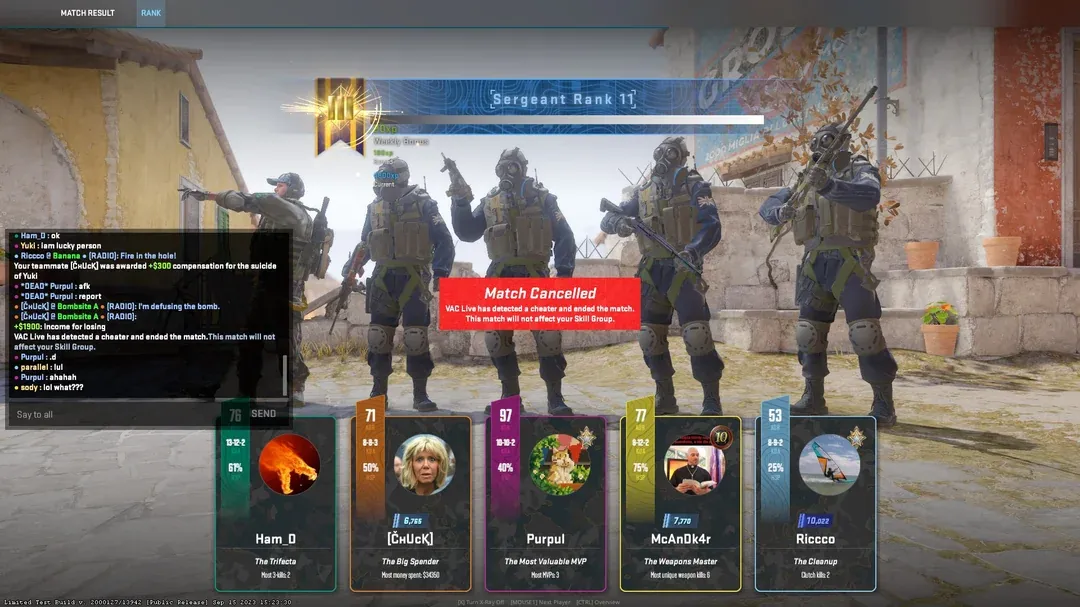
CS2's VAC Live system can detect cheaters mid-match and cancel the game, protecting your rating. If you see the "Match Cancelled" screen shown above, VAC Live caught a cheater in your lobby. This match won't affect your rating or your Trust Factor.
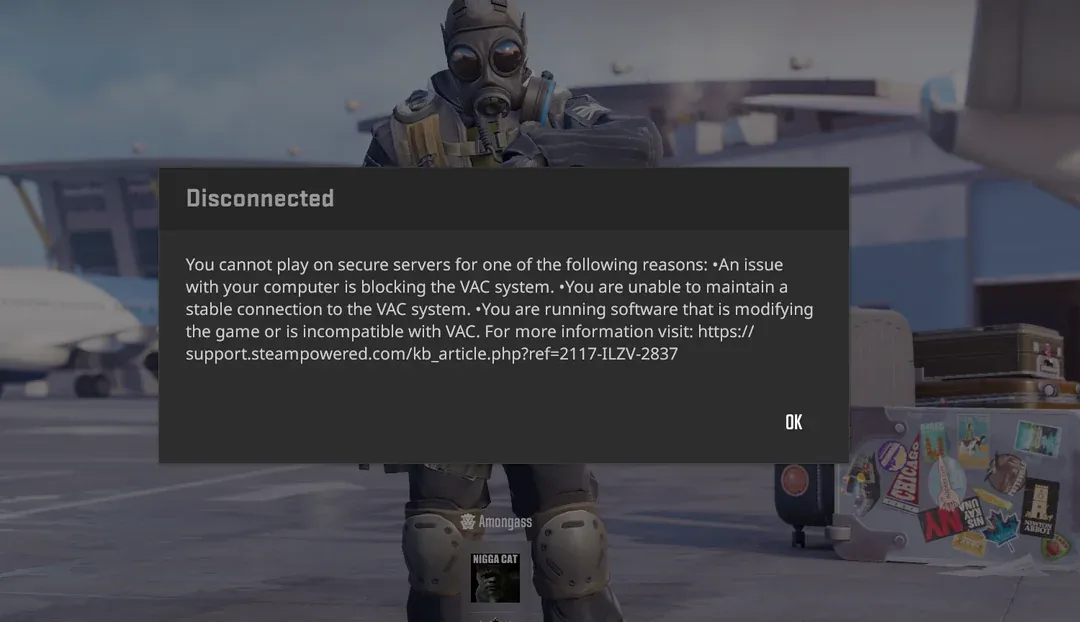
If you're getting disconnected with a VAC error like the one above, it doesn't necessarily mean you're banned – it could be a file verification issue. Verify your game files through Steam and ensure no software is interfering with VAC. Repeated VAC disconnects, however, could negatively affect your Trust Factor.
Common Trust Factor Myths
There's a lot of misinformation about Trust Factor. Here's what's not true:
- "Commending players improves your trust" – There is no evidence that receiving or giving commendations affects Trust Factor. Commends are a separate, largely cosmetic system
- "Websites can check your exact Trust Factor" – No third-party site has access to your Trust Factor score. Sites that claim to show a percentage are using publicly available profile data, not actual Trust Factor values
- "Trust Factor resets if you don't play for a few weeks" – While a break can improve your trust, it doesn't fully reset. Some accounts in deep low trust have gone inactive for months with no improvement
- "Reporting players lowers your own trust" – There is no evidence that using the report function affects the reporter's Trust Factor
- "Playing casual or deathmatch improves trust" – While it contributes to overall playtime, casual modes alone are unlikely to significantly improve Trust Factor compared to legitimate competitive play
What to Do If You're Stuck in Low Trust
If your Trust Factor is in the red and nothing seems to help, here's a realistic plan of action:
- Stop playing ranked modes for 2 weeks – No Premier, no Competitive. Let the system cool down
- Email Valve at CSGOTeamFeedback@valvesoftware.com with your Steam ID
- Clean up your account – Remove banned friends, remove third-party launch options, ensure Steam Guard is active
- Invest in your account – Purchase Prime if you don't have it, buy a game or two, open some cases
- Play casually during your break – DM, retakes, or FACEIT matches won't affect your Trust Factor negatively
- Return carefully – When you start playing ranked again, avoid behaviors that generate mass reports. Play normally but understand your Trust Factor may be fragile at first
If your Trust Factor remains stuck after trying everything, consider playing on FACEIT as an alternative. FACEIT uses its own anti-cheat and ranking system independent of Valve's Trust Factor.
The Bigger Picture
Trust Factor is an imperfect system trying to solve an incredibly difficult problem. While it genuinely works well for the majority of players – Valve has stated that 96% of players have high trust and encounter a confirmed cheater roughly once every 40 matches – it can be brutally unfair to the minority who fall through the cracks.
The biggest criticism is that skilled legitimate players can be punished by a system designed to catch cheaters, simply because their good performance generates reports. Until Valve adds more weight to report accuracy or implements better distinction between skilled players and cheaters, this will remain a pain point.
For now, the best approach is prevention: maintain a healthy Steam account, play consistently, and avoid anything that could flag your account. And if you're looking for a community of legitimate players to queue with, consider joining a dedicated CS2 community.
Looking for trustworthy teammates to queue with? Join our CS2 Central Discord community of 22,500+ players to find fair matches and avoid the solo queue gamble.
Frequently Asked Questions
What is Trust Factor in CS2?
Trust Factor is a hidden matchmaking score in Counter-Strike 2 that determines the quality of your matches. It evaluates your Steam account history, in-game behavior, and other factors to match you with players of similar standing. Higher Trust Factor means fewer cheaters and better match quality.
How can I check my CS2 Trust Factor?
There is no official way to check your exact Trust Factor score. However, you can estimate it by checking the "Looking to Play" counter in the lobby (20+ players suggests high trust, 0-5 suggests low trust during peak hours), or by queuing with friends who have Prime status to see if a trust warning message appears.
How do I improve my CS2 Trust Factor?
Play legitimately and consistently, maintain Prime Status, link a phone number to your account, avoid getting reported, spend money on Steam (especially in CS2), and keep your Steam account in good standing across all games. Remove -allow_third_party_software from your launch options if you have it. If nothing works, email CSGOTeamFeedback@valvesoftware.com with the subject "Trust Factor Feedback."
Does getting reported lower my CS2 Trust Factor?
Yes, reports can affect your Trust Factor, especially if you receive many reports in a short period of time. A few reports spread over weeks likely won't matter, but a burst of reports in a single session can lower your trust. Established accounts with long history and service medals are more resistant to report-based trust drops.
Does spending money on Steam improve Trust Factor?
Community experience suggests that spending money on Steam, particularly directly in CS2 through case openings, operation passes, and market purchases, can help improve Trust Factor. However, it is not a guaranteed fix, especially for brand new accounts or accounts that have been flagged for cheating.
What do the Trust Factor warning colors mean?
Green (no warning) means high Trust Factor with the best match quality. Yellow shows a warning that a party member's trust "may be slightly impacted" and will somewhat reduce match quality. Red shows a warning that a party member's trust "will be significantly affected," indicating very low Trust Factor with frequent cheaters and long queue times.
Can I email Valve to fix my Trust Factor?
Yes. Valve provides the email CSGOTeamFeedback@valvesoftware.com for Trust Factor issues. Include "Trust Factor Feedback" in the subject line and your Steam ID in the body. Valve will not reply, but some players have reported improvements after emailing. Results are not guaranteed.
Further Reading
- Valve's Official Trust Factor Blog Post
- Steam Support: Trust Factor Matchmaking FAQ
- CS2 Prime Status and Free to Play
- John McDonald's GDC Talk: Using Deep Learning to Combat Cheating
- KERO's CS2 Trust Factor Guide – Detailed community breakdown of Trust Factor nuances
- How to Avoid CS2 Scams – Protect your account and skins
- Steam Desktop Authenticator Guide – Secure your Steam account
