CS2 skin trading is a massive market, and where there's money, there are scammers. Whether you're new to trading or have a valuable inventory, understanding these scams is essential. In this guide, we'll cover the 10 most common CS2 scams in 2026 and exactly how to protect yourself.
One rule applies to every scam on this list: if it sounds too good to be true, it's a scam. Keep that in mind as we go through each method.
1. Phishing & API Scam
Phishing is the most common scam method and the gateway to the dangerous API scam. Scammers create fake websites that look identical to legitimate ones (Steam, trading sites, tournament pages) to steal your login credentials and set up API access to your account.
How It Works
You receive a link to what looks like a legitimate website. The design is nearly identical to the real thing. When you "log in," the scammer captures your credentials. But here's where it gets worse: the fake site also creates a Steam API key linked to the scammer's systems.

With this API key, scammers can monitor ALL your trades, sometimes waiting months before striking. When you make a legitimate trade (e.g., with CS.MONEY), their bot instantly cancels it and sends you an identical-looking trade offer from their account. You confirm on your phone thinking it's real, and your items are gone. This all happens in under one second.
How to Spot Fake Login Pages
There's a simple test that works every time: the popup window test.
- Real Steam login opens as a separate window you can drag anywhere on your screen, even to a second monitor
- Fake login popups are embedded in the website. Try dragging it outside the browser window and it disappears
- If you're already logged into Steam, legitimate sites show "Sign in as [username]" instead of asking for credentials
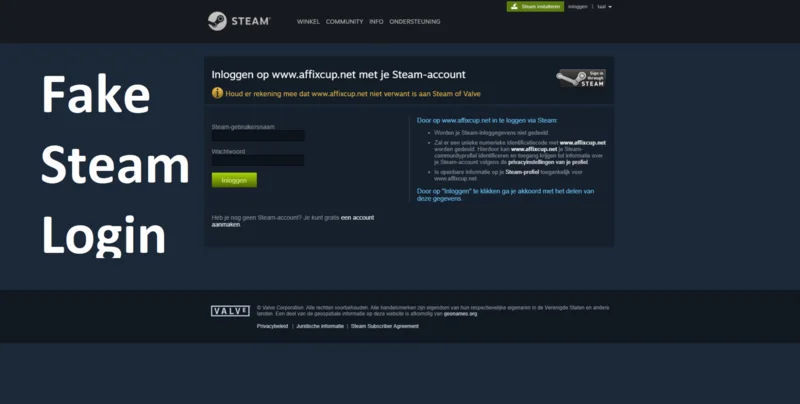
Always check the URL carefully. Scammers use tricks like stearncomnunity.com instead of steamcommunity.com. One wrong letter is all it takes.
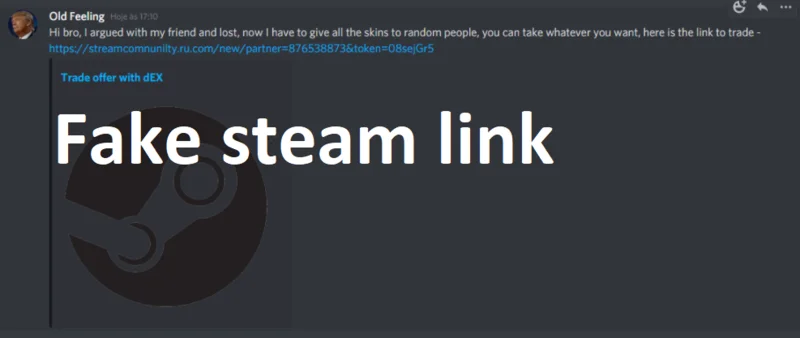
How to Check If You're Compromised
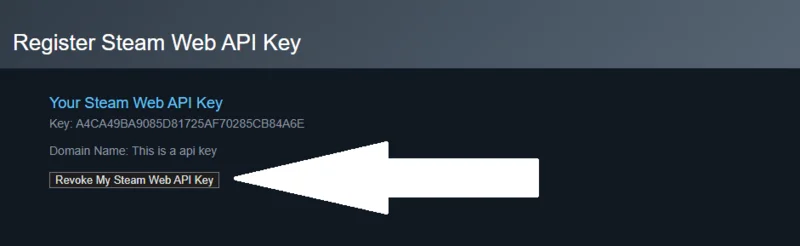
Go to steamcommunity.com/dev/apikey. This page should be completely blank for most users. If you see an API key you didn't create, you've been compromised.
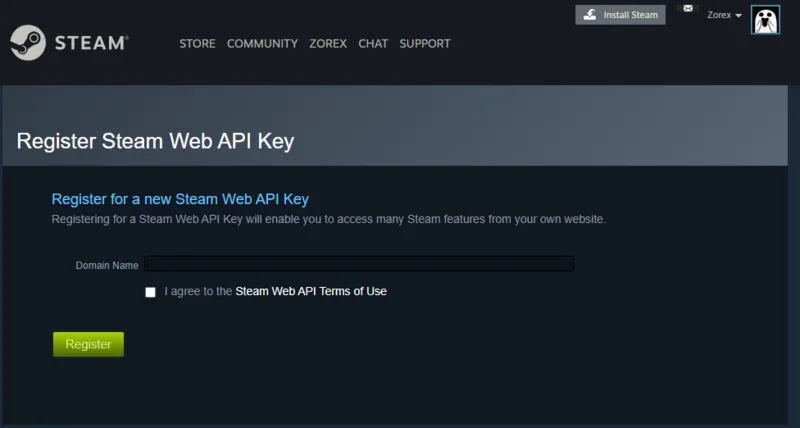
If you find an unauthorized API key, click "Revoke My Steam Web API Key" immediately to remove the scammer's access.
Prevention & Recovery
- Never click links from strangers in DMs
- Type
steamcommunity.comdirectly into your browser - Bookmark legitimate trading sites and only use those bookmarks
- Check your API key page regularly (bookmark it)
- Never accept trades from Steam notifications. Go back to the trading website and accept from there
If you've been compromised: Revoke the API key immediately, change your Steam password, change your email password, and deauthorize all devices in Steam settings.
2. Malware & Fake Verification Popups
Scammers use fake websites and popups to trick you into running malicious code on your computer. One of the most dangerous recent methods involves fake "human verification" popups.

The Fake Cloudflare Verification
A particularly nasty scam shows a fake Cloudflare "verify you are human" popup on phishing sites (often disguised as Faceit or tournament pages). Instead of a normal checkbox, it instructs you to:
- Press Win + R (opens Windows Run dialog)
- Press Ctrl + V (pastes malicious code)
- Press Enter (executes the malware)
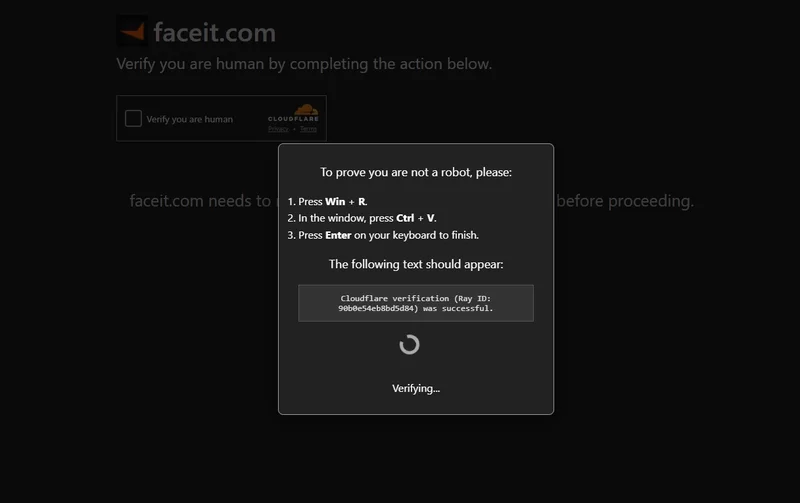
This is never legitimate. Real Cloudflare verification is a simple checkbox or puzzle. No legitimate website will ever ask you to open the Run dialog and paste code.
What Happens After Infection
Once malware infects your system, scammers can take control of your Steam account. They often display fake messages in your Steam client to prevent you from recovering your account:
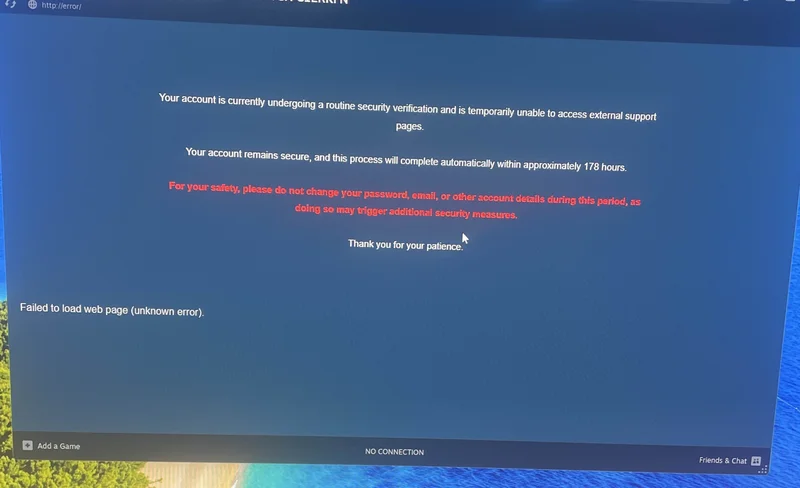
The fake message claims your account is undergoing "routine security verification" and warns you not to change your password for 178 hours. This is completely fake. The scammer is trying to buy time to steal your items. If you see this, immediately change your password from a different device.
Prevention
- Never run commands that a website tells you to paste into Win+R or terminal
- Real Cloudflare checks are simple checkboxes, not command instructions
- Don't download files from strangers or untrusted links
- Use antivirus software and keep it updated
- If infected, use a separate device to change your passwords immediately
3. QR Code Scam
This scam has exploded on social media. One victim lost an inventory worth $60,000 to a single QR code scan.
How It Works
You see a "giveaway" stream on YouTube, TikTok, or Instagram. They show a QR code claiming "scan to log in and claim free skins." When you scan it, you're not logging yourself in. You're authenticating the scammer's session on your account.
Within seconds, they have full access. They change your Steam Guard, authenticator, and steal everything. Victims report getting SMS notifications about changed security settings from Russia while watching their inventory disappear.
Where It Appears
- YouTube live streams (fake giveaways)
- YouTube Shorts
- TikTok videos
- Instagram posts and stories
Prevention
- Never scan QR codes from unknown sources
- Only use QR login on websites you navigated to yourself
- Nobody is giving away expensive inventories. It's always a scam
- Report fake giveaway streams immediately
4. Impersonation Scams
Scammers pretend to be someone trustworthy: a famous trader, content creator, your friend, or a server admin.

Common Types
- Content Creator Impersonation: "Hey, I'm [famous streamer] and I want to trade with you." Your favorite YouTuber will never randomly add you asking for trades.
- Friend Impersonation: Scammer copies your friend's profile picture and name, claims their "main account got locked."
- Rich Trader Impersonation: Shows screenshots of expensive inventories claiming they own them, sends trade links to other people's profiles.
Prevention
- Check Discord profiles for linked Steam accounts. Scammers rarely have the real account linked
- Verify through another channel. If a "friend" messages you, call them or message on a different platform
- Don't trust screenshots or trade links as proof of identity
- Real content creators don't DM random people for trades
5. Tournament & Faceit Scams
"Hey, I need a player for my tournament team. Can you sign up on this site?" This message has cost countless players their inventories.
How It Works
- Random person adds you on Steam or Discord
- "I need a rifler for my tournament, you'd be perfect"
- "Just sign up on this site and join our hub"
- The site is a phishing page that steals your Steam login
- Your account is compromised, items gone
Important Warning
This can come from compromised friend accounts. If your friend's account gets hacked, scammers use it to target their friends list. Even if the message comes from someone you know, verify through voice chat or another platform before clicking any links.
Prevention
- No stranger is going to invite you to play in a tournament
- Verify tournament sites independently (Google the tournament name)
- Only use the official Faceit website: faceit.com
- If a friend invites you to something sketchy, verify through voice chat first
6. Fake Trading Bot Scam
You use a legitimate trading site, but a scammer sends you a fake trade offer that looks identical to the real bot's offer.

How It Works
- You start a trade on a real website (CS.MONEY, Bitskins, etc.)
- You go to Steam to accept the trade
- Scammer sends a fake trade that looks identical: same profile picture, same name, same items
- You accept the wrong trade
- Your items go to the scammer instead of the legitimate bot
Prevention
- Never accept trades directly from Steam notifications
- Go back to the official trading website
- Accept the trade from within the website's interface
- The website will show you which trade offer is theirs
If you're looking for a safe place to trade CS2 skins, our Discord has moderated trading channels with verification systems to help prevent scams.
7. Discord Scams
Discord is where much of the CS2 community hangs out, making it a prime target for scammers.
Types of Discord Scams
- Fake Profiles: Scammers create believable profiles, join trading servers, and DM users with "great deals"
- Fake Giveaway Bots: Bots post "giveaway" links that lead to phishing sites
- Nitro Scams: "Free Discord Nitro" links that require Steam login (phishing)
- DM Trades: Anyone pushing you to trade via DM instead of public channels is likely a scammer
Prevention
- Don't trust random DMs about trading
- Never click links from unknown users
- Use server trading channels with active moderation instead of DMs
- Check user's server history and roles before trading
Our CS2 Central Discord has strict moderation and scam prevention measures. Trading happens in dedicated channels where staff can help if something seems off.
8. Cash & PayPal Scams
Someone offers to buy your skins for real money through PayPal, gift cards, or crypto. These trades are extremely risky.

Why It's Dangerous
- "Send first" scam: You send your skin, they block you and never pay
- PayPal chargeback: Even if they pay first, they can file a dispute claiming fraud. PayPal sides with buyers, and you lose both the skin AND the money
- Chargebacks can happen weeks or months after the transaction
- Digital goods have almost no seller protection on PayPal
Prevention
- If you want to sell for real money, use trusted marketplaces with escrow systems like CSFloat
- Never send skins before receiving verified, non-reversible payment
- Understand that even receiving PayPal payment first isn't safe
- Only do direct cash trades with people you know and trust in real life
9. Fake Casino & Gambling Scams
Scammers create elaborate fake gambling sites designed to steal your skins through various tricks.
The Classic Fake Casino
A "friend" you met in-game recommends a new gambling site. They give you free credits to start. The site looks active with people betting and chatting. You win with the free credits, get excited, deposit your own skins, and lose everything. The whole thing was fake: the chat was bots, the games were rigged, and sometimes you can't even withdraw your "winnings."
One player shared his experience: he deposited a $120 Butterfly Knife, spent two days carefully "winning" to double his money, and when he tried to cash out his $240 in winnings, nothing worked. The site was fake, and he lost everything.
The Deposit Scam Variation
A fake site lets you "win" valuable items, but requires a deposit to "verify you're real" before withdrawing. You're riding the dopamine high of winning, you deposit, and both your deposit and "winnings" disappear.
Prevention
- Don't use gambling sites recommended by people you met in-game
- If you can't withdraw without depositing first, it's a scam
- Check independent reviews, not just YouTube (those can be viewbotted)
- If it seems too easy to win, you're the product
10. Fake Steam Support Scam
Scammers pretend to be Steam Support or Valve employees, using threats and urgency to steal your items.

Common Claims
- "Your account has been flagged for suspicious activity"
- "We detected illegal items in your inventory"
- "You need to verify your items by trading them to us"
- "Your account will be banned unless you cooperate"
The Truth About Real Steam Support
- Valve/Steam NEVER contacts you through DMs or Steam chat
- Official support is ONLY through help.steampowered.com
- They will NEVER ask for your items or password
- They don't threaten bans via chat messages
Prevention
- Ignore all "Steam Support" messages outside official channels
- Never trade items for "verification" or "safekeeping"
- If you're worried about your account, go directly to help.steampowered.com
What To Do If You Get Scammed
If you've fallen for a scam, act quickly:
Immediate Steps
- Change your Steam password immediately
- Change your email password
- Revoke API access at steamcommunity.com/dev/apikey
- Deauthorize all devices in Steam settings
- Report the scammer's profile
Important Reality Check
Steam Support cannot return scammed items. Trades are final. The best they can do is help you recover a compromised account. Prevention is the only real protection.
General Safety Tips

The Golden Rules
- If it's too good to be true, it's a scam. Free skins don't exist. Amazing deals from strangers are traps.
- Never trust strangers. Don't trade with random adds. Don't click links from unknown sources.
- Use trusted platforms. Trade through established marketplaces. Use bookmarked links, not Google searches.
- Protect your credentials. Unique passwords. Steam Guard enabled. Never share API keys or Steam Guard codes.
- Take your time. Legitimate deals don't require instant decisions. If you feel pressured, walk away.
Security Checklist
- Steam Guard Mobile Authenticator enabled
- Strong, unique password for Steam
- Strong, unique password for email
- API key page is blank
- Trusted trading sites bookmarked
- 2FA enabled on email account
Stay Safe, Trade Smart
Scammers are constantly evolving their methods, but the fundamentals stay the same: they rely on urgency, greed, and trust. Take your time, verify everything, and never let anyone pressure you into quick decisions.
If you want to trade in a safer environment, join our CS2 Central Discord. We have 22,500+ members, moderated trading channels, and a community that looks out for each other. Our trading bot even includes a /scams command that teaches you about these scams with visual examples.
Stay safe out there.
Frequently Asked Questions
Can Steam Support recover my scammed items?
No. Steam Support cannot return items lost to scams. All trades are final. They can help you recover a compromised account, but the items themselves cannot be restored. This is why prevention is critical.
How do I check if my account has been compromised?
Check your Steam API key page at steamcommunity.com/dev/apikey. If you see any API key listed that you didn't create, your account has been compromised. Delete it immediately and change all your passwords.
Is it safe to trade CS2 skins for real money?
Direct cash trades are risky. PayPal chargebacks can happen months later, and you have no seller protection for digital goods. If you want to sell for real money, use established marketplaces with escrow systems like CSFloat, Skinport, or Buff163.
How can I verify if a trading website is legitimate?
Never Google trading sites and click ads. Use bookmarked links or links from trusted content creators. Check if the Steam login opens as a real separate window (not embedded in the page). If you're already logged into Steam, legitimate sites show "Sign in as [username]" instead of asking for credentials.
Someone is offering way more than my skin is worth. Is it a scam?
Yes, 99.9% of the time. If someone random adds you offering more than market value, it's a scam. They'll try to get you to log into a fake site, use a fake middleman, or trick you some other way. Legitimate buyers use marketplaces.
My friend sent me a suspicious link. Should I click it?
Your friend's account may be compromised. Scammers use hacked accounts to target friend lists with tournament invites, giveaways, or trading links. Verify through voice chat or another platform before clicking anything.
What's the safest way to trade CS2 skins?
Use established trading websites and marketplaces like CSFloat. Accept trades only from within the website's interface, never from Steam notifications. For peer-to-peer trades, use servers with active moderation like our CS2 Central trading channels.